
Google Review Management Software for Local Businesses & Agencies
Get more Google reviews on autopilot. GBPly sends review requests by email and SMS, prints QR flyers, shows your reviews on your website and helps you reply to every one — all from one place.
Want the strategy first? Read how to get more Google reviews.
Why Google Reviews Matter
Reviews aren't just nice to have—they're a critical factor in your local search visibility and customer trust.
of consumers use reviews to evaluate a local business
Source: Google, Best Practices Playbook 2026
are more likely to choose a business that responds to reviews
Source: Google, Best Practices Playbook 2026
say reviews influence their purchasing decisions
Source: BrightLocal Local Consumer Review Survey (consumer survey)
read online reviews before visiting a business
Source: BrightLocal Local Consumer Review Survey (consumer survey)
Google Review Request Software, Built In
A Google review widget for your website, email and SMS review request campaigns, Google review QR code flyers, a review playbook tailored to your business type, and an API for automated Google review requests from your EPOS or CRM.
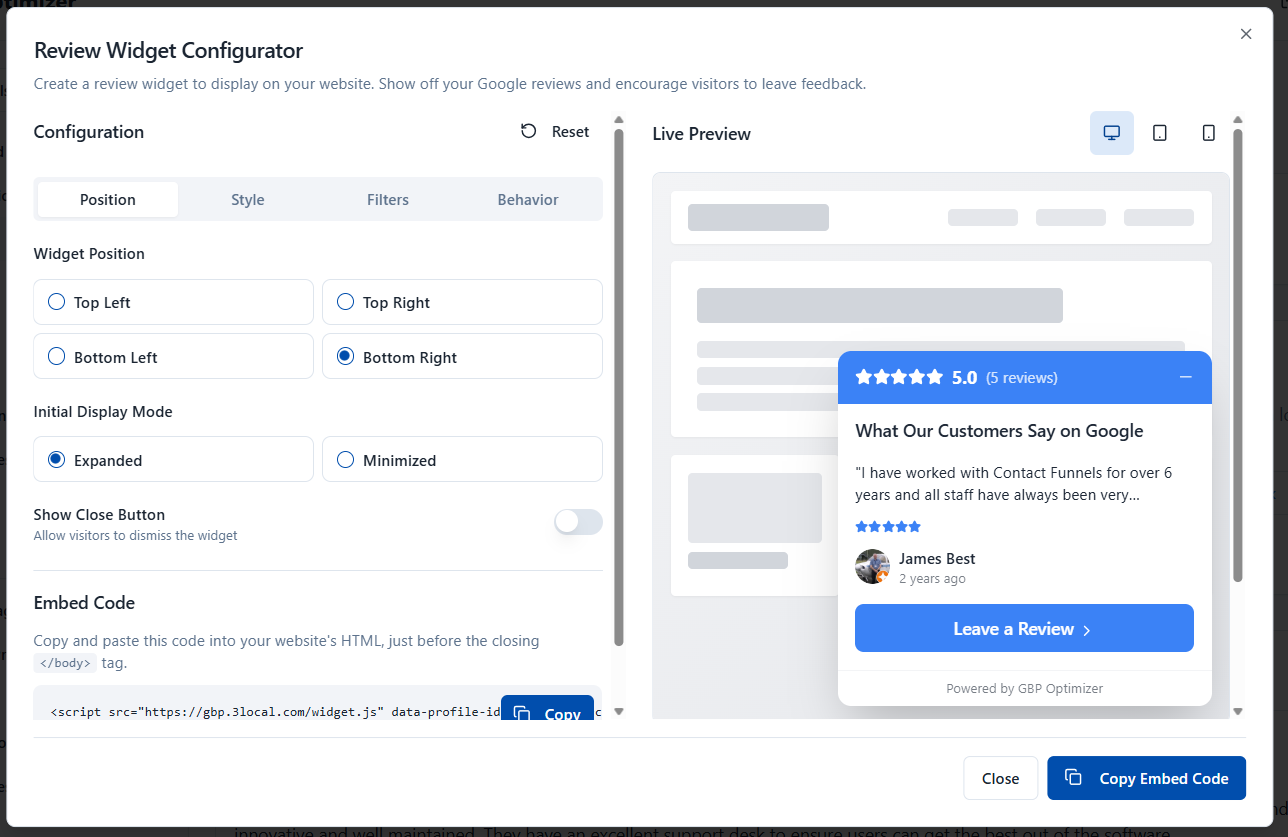
Display Your Reviews Where They Matter Most
Turn website visitors into customers by showcasing your Google reviews directly on your site. Showing real Google reviews on your own site puts that social proof in front of visitors at the moment they are deciding.
Automate Your Review Requests with Smart Email Campaigns
Paste your customer list and let the system drip-feed review requests over time. Intelligent scheduling prevents spam complaints while maximizing response rates.
Pro Tip
Ask for reviews when the experience is fresh—within 24-48 hours of service completion.
Printable QR Flyers for In-Person Review Collection
Generate branded flyers with QR codes that link directly to your Google review page. Perfect for storefronts, home services, and any customer touchpoint.
Storefronts
Display at the counter or in your window
Product Packaging
Include copies in shipped packages
Home Services
Present to customers at job completion
Events & Trade Shows
Collect reviews from event attendees
Love our service?
Scan to leave us a review!
Your Business Name
A Review-Collection SOP Written for Your Type of Business
A dentist, a plumber and a restaurant should not ask for reviews the same way. GBPly reads your Google category, asks a couple of questions about how you serve customers, and builds a step-by-step playbook you can hand straight to your team.
- Matched to your business type: we detect your archetype from your Google category — in-store, on-site, appointment-based or remote.
- Who asks, when, and what they say: the exact moment in your customer journey, plus wording your staff can use out loud.
- Staff-ready SOP: print it or share it as a one-page standard operating procedure for onboarding and training.
- Policy-safe by design: no incentives and no review gating anywhere in the recommended process.
Example playbook outline
- 1Detect business type from your Google category
- 2Pick the natural ask moment in your customer journey
- 3Assign the ask to a role (front desk, technician, owner)
- 4Choose the channel: in person, SMS, email or QR
- 5Set the follow-up rule and who replies to reviews
One request from your system
POST /api/review-request
x-api-key: your_profile_key

{
  "name": "Jane Doe",
  "email": "jane@example.com",
  "phone": "+441234567890"
}
Fire it when a sale completes or a job is closed. GBPly handles the request, the timing and the follow-up.
Connect Your EPOS or CRM and Ask Automatically
The most reliable way to get more Google reviews is to stop relying on anyone remembering. Our review request API lets your till, booking system, CRM or job-management software trigger a review request the moment the work is done.
- Per-profile API keys: each business profile gets its own key, so multi-location and agency setups stay separated.
- Real-time triggers: works with EPOS systems, CRMs, booking tools and Zapier-style automations via a simple POST.
- Email or SMS delivery: requests go out through the same paced, policy-safe campaigns as the rest of the platform.
- Pacing and de-duplication: customers aren't asked twice, and volume is spread out rather than sent in bursts.
Also included with every profile
How Reviews Drive More Business
Each review creates a positive cycle that brings more customers to your business.
Great Experience
Customer has a positive experience with your business
Request Review
Send an email, present a QR flyer, or share your review link
Customer Reviews
Customer leaves a 5-star review on Google
Manage & Respond
Review appears in your dashboard; respond with AI assistance
Display on Website
Review widget showcases your reviews to website visitors
Convert Visitors
New visitors see social proof and become customers
Review Management Across Every Client Location
Run review request campaigns, reply to reviews and track ratings for every profile you manage from one dashboard — and let clients approve and send requests themselves through a branded client portal.
Google Review Software: Common Questions
What businesses and agencies ask before using GBPly to collect and manage Google reviews.
What does GBPly's Google review software do?
How are review requests sent?
How much do SMS review requests cost?
Is automated review requesting allowed by Google?
Does it work for multiple locations and agencies?
Can I automate Google review requests from my EPOS or CRM?
Can I reply to Google reviews from GBPly?
Last reviewed August 2026. Google's review policies change — check Google's own guidelines before running any review campaign.
Ready to Get More Google Reviews?
Set up your review requests, QR flyers and website widget in minutes — and let GBPly do the asking, chasing and displaying for you.
We use cookies
Essential cookies run the site. Optional analytics and marketing cookies (including the LinkedIn Insight Tag) help us understand usage and measure our advertising — they are not needed to use GBPly, and declining them costs you no functionality. See our Privacy Policy.