
Rank Replay: Google Maps Ranking History as an Animated Timeline
Every geo-grid scan you run is saved as a frame. Rank Replay plays those frames back in order, so you can watch your Google Maps visibility grow, shrink or move across the map over weeks and months — then share the whole story with a client in a few seconds.
What Is Rank Replay?
A geo-grid scan shows where you rank across your service area right now. Rank Replay shows how that picture got there.
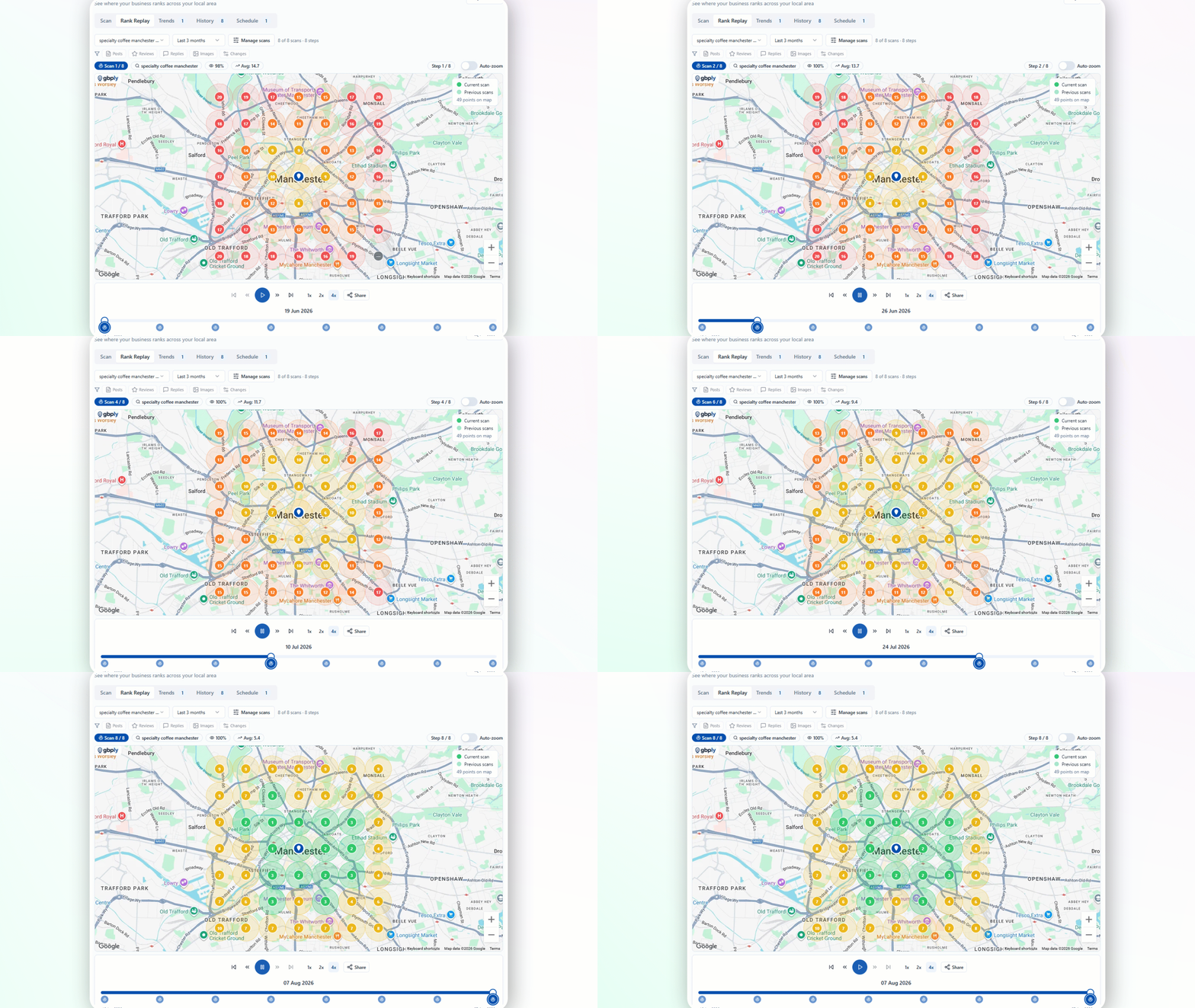
Each time you scan the same keyword and grid, GBPly stores the position recorded at every grid point. Rank Replay treats each of those saved scans as a single frame of an animation, ordered by date. Press play and the heatmap redraws itself — green areas spreading outward as visibility improves, or retreating when it doesn't.
That matters because local rankings aren't one number. A change might mean you gained three streets to the north and lost two suburbs to the west. An average position hides that entirely; an animated map makes it impossible to miss.
Rank Replay is part of the Google Maps rank tracker, so there's nothing extra to set up. Run scans, and the timeline builds itself.
How Rank Replay Builds Your Timeline
Three steps, and then it accumulates on its own.
Run a Geo-Grid Scan
Pick a connected Google Business Profile, enter a keyword and scan. That first heatmap becomes your baseline frame.
Schedule the Same Scan
Set the scan to repeat — weekly is the most common. Each run captures the same keyword and grid so the frames are directly comparable.
Press Play on Rank Replay
Once there are multiple scans, Rank Replay animates them in order so you can watch local visibility expand, contract or shift across the map.
What You Can Do in Rank Replay
Built for reading change, not just recording it.
Play Your Ranking History Back
Press play and watch the geo-grid heatmap redraw itself scan by scan, so movement across the map is obvious without comparing screenshots side by side.
Frames Built by Scheduled Scans
Set a recurring scan for a keyword and grid. Every scan that runs adds another frame, so a weekly schedule quietly builds a week-by-week visibility timeline.
Date Ranges and Playback Speed
Replay the last month, the last three months or a custom window, and slow the playback down when you want to study a specific change.
Profile Activity on the Timeline
Posts, photos, reviews, replies and detected profile changes are marked alongside the scans, so the work sits next to the movement it might explain.
Export a Shareable GIF
Generate an animated GIF of the replay to drop into a client report, a proposal, an email or a social post.
One Keyword at a Time, Any Keyword
Switch between the keywords you track for a profile, and exclude individual scans if a one-off test scan would distort the sequence.
See What You Did, Next to What Changed
Rank Replay isn't only a record of rankings. As the timeline plays, the profile's own activity is marked alongside the scans — so you're watching the movement next to the work that came before it, rather than trying to remember what you changed and when.
What that looks like in practice
A weekly scheduled scan has been running for six months. Two months in, a run of new reviews lands and appears as markers on the timeline. On the next scan after them, the heatmap widens across the service area. You still can't call that proof of cause — but you now know exactly what happened, and when, without cross-referencing three separate reports.
Timeline correlation is a diagnostic aid, not attribution: local results also move for reasons outside the profile, including competitor activity and Google's own ranking changes. How we handle claims like this is set out in our research and methodology notes, and the scans themselves come from the Google Maps rank tracker.
Why Recording Ranking History Matters
Google doesn't hand you an archive of past local results. If a scan wasn't run, that week is gone — which is why a schedule is worth setting up before you need the evidence.
For Local Businesses
If you're doing the work on your own profile, Rank Replay is how you find out whether it landed.
When the replay shows a weak area, the next step is usually to improve your Google Business Profile and let the following scans tell you whether it worked.
Rank Replay in the Client Portal
Client retention comes down to whether progress is visible. Rank Replay makes months of local SEO work into something a client can watch in ten seconds.
Clients Watch It Themselves
Rank Replay is one of the sections you can switch on in a client portal, so clients open a link and play back their own history — no login to the main app. They see your work on the same timeline: the posts that went out, the reviews that came in, the replies you wrote, the photos you added and the profile changes you made.
Proof Instead of a Spreadsheet
An animated map of the last three months lands with a client far faster than a table of average positions ever will.
White-Labelled
Portals are served from a neutral domain with your branding, so the replay looks like part of your own reporting.
Reusable Deliverable
Export the replay as a GIF for monthly reports, renewal conversations and case studies.
Because posts, photos, reviews, replies and profile changes are marked on the same timeline, the replay doubles as a record of the work. A client can play back the last six months and see what the retainer actually bought, in order, next to how the map moved for the keywords you track. For you, that's monthly reporting that assembles itself from activity already logged in the platform — no screenshots to collect and no deck to rebuild.
See how the rest of the white-label toolkit fits together on our page for search marketing agencies.
Set the Schedule Before You Need the History
Rank Replay can only play back scans that were actually run. A weekly recurring scan on your priority keywords costs a handful of credits and means that in three months you'll have a timeline instead of a single snapshot.
Scan credits are workspace-level and pay-as-you-go, so a schedule doesn't mean another per-location subscription. Full details are on the rank tracker page and in pricing.
Rank Replay FAQs
What is Rank Replay?
How do I see my Google Maps ranking history?
How many scans do I need before Rank Replay works?
How far back can Rank Replay go?
How often should I scan to build a useful timeline?
Can my clients view Rank Replay?
What happens to Rank Replay if I delete old scans?
Can I share or export a Rank Replay?
Can I see posts, reviews and profile changes on the replay timeline?
Last reviewed August 2026. Google's local results change over time — treat each frame as a snapshot of what was returned at the time of that scan, not a guaranteed position.
Turn Your Rank Tracking Into a Story You Can Play
Start scanning today, schedule it weekly, and Rank Replay will show you — and your clients — exactly how local visibility changed.
Pay as you go scan credits. No separate rank-tracking subscription.
We use cookies
Essential cookies run the site. Optional analytics and marketing cookies (including the LinkedIn Insight Tag) help us understand usage and measure our advertising — they are not needed to use GBPly, and declining them costs you no functionality. See our Privacy Policy.